Contents
You are now reading:
Fake reviews on Google – how to report a review and what to do when reviews disappear or your rating drops?
Close
One way to increase conversions is through reviews on Google Maps. Why are they so important for listing administrators and future clients? Why it's worth acquiring more positive reviews and using them effectively, and—the key topic of this article—how to remove a negative review on Google. We also explain why reviews sometimes disappear and what to do when a company's rating drops. Check and present yourself effectively online. It pays off!
The golden rule is: "Sales don't happen by chance." It's a process that involves many responsibilities and a range of techniques that, when used properly, can translate into easy closing of deals. One such technique is, for example, the right form of communication. Krzysztof Rzepkowski, CEO of Sandler Training Polska, shared more about this verbal and nonverbal communication in a special interview.
We now know that it's not just what we say that matters, but also how we present the information. What else plays a key role in a customer's decision-making process? For example, a positive experience with the brand, consistency of communicated values, and price (though contrary to what customers say, this isn't the most important factor!). Most important, however, is trust. Without it, there are no sales! How can we build trust with a customer we don't have direct contact with and who has never used our services before? Reviews, recommendations, and social proof are key here ... And you can achieve all of this by using a Google Business Profile!
Google Reviews – Why Are They So Important?
It's quite simple. Each of us has searched online for a product or service we've never used before. Therefore, we have no comparison group, nor is our knowledge of whether a given product is worth investing in. Where can we get this information? Of course – from the internet! A Google user can find it in no time.
(The rest of the article can be found below the form)
Fill out the form and schedule a call with an expert
We'll get to know your business and prepare a personalized quote for the optimal marketing mix. Completely free.
The controller of your personal data is Verseo, a limited liability company with its registered office in Poznań, at ul. Węglowa 1/3.
About Verseo
The Company's registered office is located in Poznań. The Company is entered in the Register of Entrepreneurs maintained by the District Court for Poznań – Nowe Miasto and Wilda in Poznań, 8th Commercial Division of the National Court Register, under KRS number: 0000910174, Tax Identification Number (NIP): 7773257986. You can contact us by mail at the address provided above or by email at: ochronadanych@verseo.pl
You have the right to:
- access to your data,
- rectification of your data,
- request deletion of data,
- processing restrictions,
- object to the processing of personal data,
- transfer of personal data,
- withdrawal of consent.
If you believe that we are processing your data contrary to legal requirements, you have the right to lodge a complaint with the supervisory authority – the President of the Personal Data Protection Office.
We process your data for the purpose of:
- handling your inquiry, pursuant to Article 6(1)(b) of the General Data Protection Regulation (GDPR);
- marketing purposes consisting in the promotion of our goods and services and ourselves in connection with the consent you have granted, pursuant to Article 6(1)(a) of the GDPR;
- securing or pursuing possible claims in connection with our legitimate interest, pursuant to Article 6(1)(f) of the GDPR.
Providing your data is voluntary . However, without it, you will not be able to send us a message, and we will not be able to respond to you.
We may transfer your data to trusted recipients:
- providers of tools for: website traffic analysis, sending marketing information.
- entities responsible for hosting (storing) the website and personal data.
We will process your data for the period of:
- necessary to achieve the specific purpose for which they were collected, and after its expiry for the period necessary to secure or pursue any claims
- in the case of data processing based on consent until its withdrawal. Withdrawal of consent does not affect the lawfulness of processing prior to withdrawal.
We do not process personal data in a way that would involve making solely automated decisions about you. More information regarding the processing of personal data can be found in our Privacy Policy.
It's a very quick and convenient way to determine whether a company whose offer has caught our attention is worth our trust. And consequently, our money. We quickly fire up a search engine and enter the brand name. In a flash, we receive the most important information (from the customer's perspective), which moves us one step further on the board, where the goal is a sale.
If a company is serious about marketing and SEO , the first page should display not only the domain but also the business card . We wrote more extensively about how to create a Google My Business listing in a previous post.
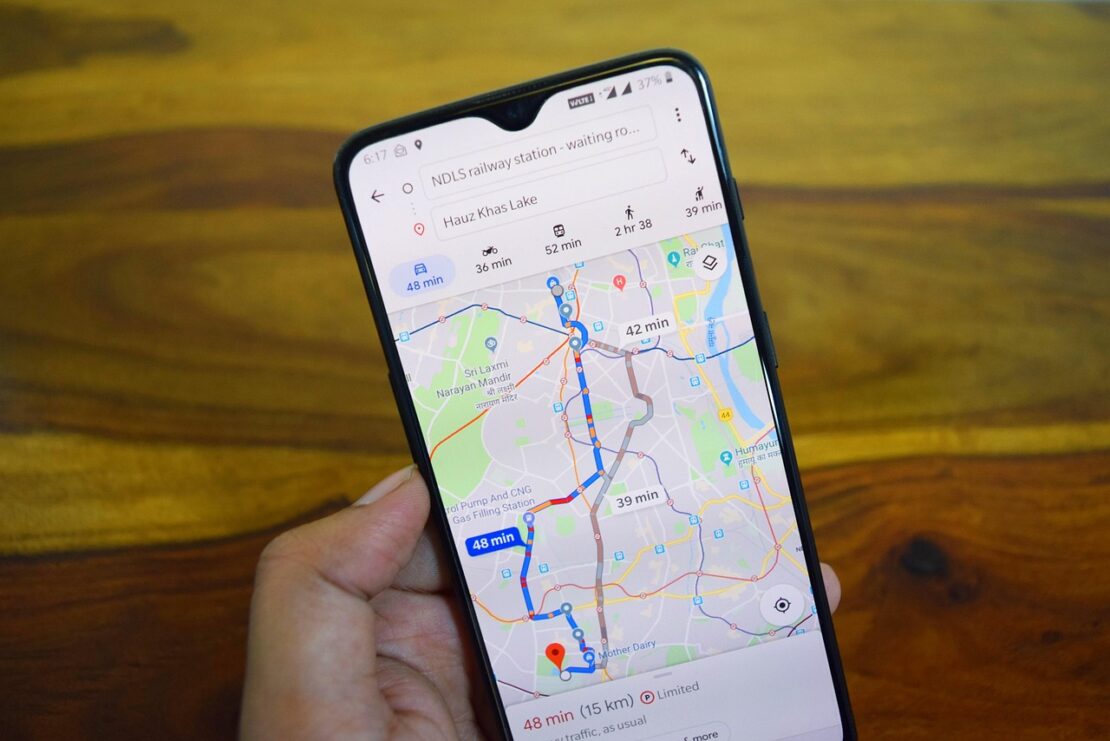
It contains, among others, data such as:
- address,
- Web page,
- phone,
- opening hours,
- customer reviews.
Importantly, this includes both high ratings and one-star reviews! Later in this article, we'll explain how to deal with negative reviews, why you shouldn't delete them, and what positive impact they can bring to your organization. For now, though, let's explain how to check your Google reviews if you have a company profile there.
How to check your opinions about a company?
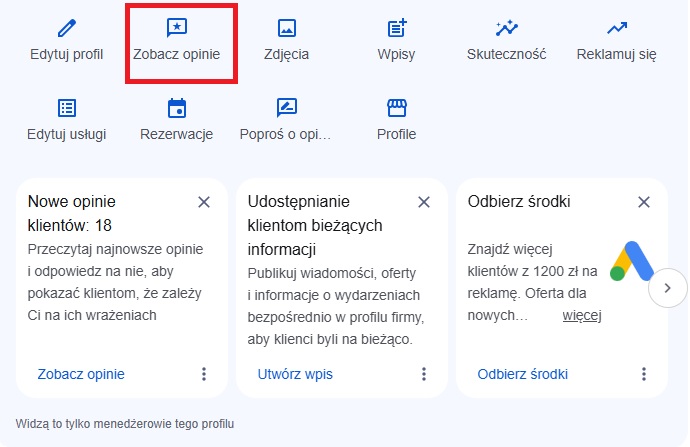
This doesn't require extensive or complicated activity. You can view reviews in your Google Business Profile management panel, and check the status of reported reviews in the Google Review Management Tool.
As we've already mentioned, your company isn't like a tomato—not everyone will like it. That's normal. For this reason, you'll encounter both positive and negative Google reviews on your company profile. Let's take a closer look.
Positive Google reviews – why are they so important?
In sales, trust is paramount – beyond liking. Google reviews help build trust with customers who haven't yet had the opportunity to test our products, services, and customer service on their own skin, nails, or other areas of their microcosm. After all, if 74% of users say it's "good," why should you be in the minority?
Social proof, which is also the basis of Google reviews, can significantly increase sales. According to a comprehensive 2019 report published by Gemius, a staggering 47% of customers believe that reviews are the most important factor in building online store credibility!
This is already a sufficient argument to take a closer look at them, and if we add to this the fact that 92% of potential customers check at least one review of a given product or company before making a purchase (according to bizrateinsights.com ) – understanding the power of opinions on Google becomes incredibly easy!
>> Increasing your e-commerce conversion rate <<
Negative reviews on Google – the devil is not as black as he is painted…
You've probably heard the saying that it doesn't matter what people say about you. What matters is that they say it. And there's some truth to that! Negative reviews about a company don't look good, but if they're true, you shouldn't try to delete them. Why?
This is an invitation to contact the client, an opportunity to amicably resolve a matter that has become a bone of contention. This will help us avoid losing the client, and perhaps even improve the quality of our services or offerings?
How do I respond to a review on Google?
Even if you're not a communication guru, you can still figure this out. In your Google Business Profile dashboard, open the reviews section, select a review, and click "Reply." Your reply is public, so write it with future customers in mind.
That's the whole story.
Remember that…
If the majority of negative reviews continue to grow over time, perhaps there's something to it and it's worth changing? No one can tell you about your company better than your customers!
Unless they are…
Fake negative reviews on Google
These are the worst kind of reviews. They don't help us refine our offerings or develop more in-depth customer communication. In short, a fake account (often set up by unfair competition) and the Google reviews it creates are doing us a disservice.
When can we suspect that a few "kind words" or a single star rating are a baseless brand review, posted by multiple accounts? While there's always a degree of uncertainty, we can usually identify fake negative comments on our Google listing by tracking the user's review history. This allows us to verify whether a mass posting of misleading reviews is taking place. Several negative reviews in one day may suggest that it's worth verifying the credibility of the account from which they were posted. If it turns out to be a fake account, you should report the review to Google.
Google classifies such activity as fake engagement. This refers to content that isn't based on real experience, is published from multiple accounts by a single person, or is created in exchange for compensation. When reporting, it's best to indicate this reason, rather than, for example, offensive content if the review is polite but untrue.
How to remove negative reviews on Google?
Removing a review on Google is only recommended if the review is genuinely fake, contains false information, or otherwise violates Google's policies. A genuine, albeit unpleasant, customer review will not be removed – Google does not adjudicate disputes between a business and a customer.
How to do it step by step:
- Secure evidence: Take a screenshot of the review with the date, author's name, and a link to their profile.
- Check your database to see if the author was your client.
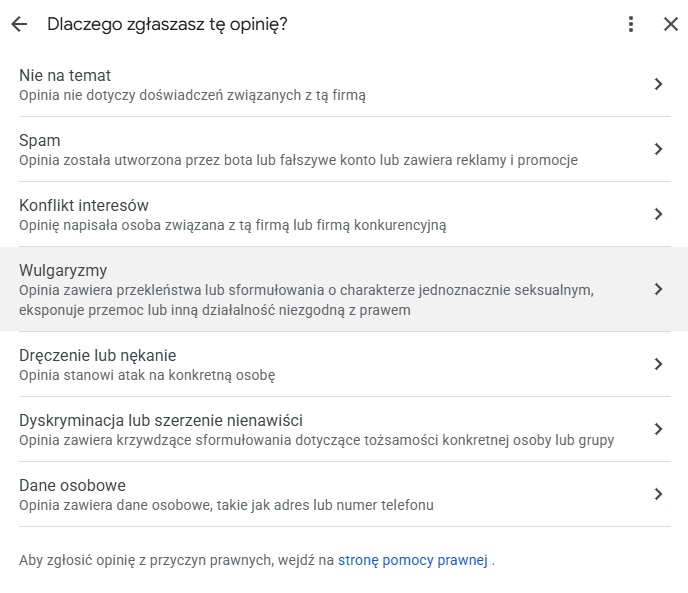
- Open your Business Profile on Google, find the review, click the three dots icon next to it, and select "Report a review."
- Indicate the type of violation that best fits the situation.
- You can check the status of your report in the Review Management Tool. If Google rejects your report, you can appeal and provide an explanation and evidence.
Review times vary, and Google doesn't guarantee a deadline or decision. If someone demands money to remove negative reviews or threatens to publish them, don't pay. Google has a separate extortion report form for these situations.
Good to know…
Google Support will also remove the review if the content of the message does not comply with the rules – for example, it may contain vulgar words or simply inappropriate content.
Why do Google reviews disappear?
The disappearance of a review from a profile doesn't always indicate an attack or error. The most common reasons are:
- Deleted by author. The customer can edit or delete his opinion at any time, as described in the article My Google Reviews – How to Check, Edit, and Delete Reviews.
- Automatic Google filters. Google's systems flag reviews suspected of being spam or fake engagement. Sometimes, genuine, positive reviews are also lost.
- Company violation. It is prohibited to, among other things, offer discounts or gifts in exchange for opinions and selectively request opinions only from satisfied customers.
- Profile changes.
If multiple reviews disappear at once, check the email address associated with your profile. Google usually notifies you of any restrictions placed on your profile. If you believe your reviews disappeared in error, contact Google Business Profile support. However, reviews removed for policy violations are usually not returned.
Purchased opinions – what are the risks of “covering up” bad reviews?
Buying reviews may seem like a quick way to improve your rating, but in practice, it can backfire.
Google Penalties. If Google determines a business is violating its false engagement policies, in addition to removing the reviews themselves, it may impose restrictions on the profile :
- the profile cannot receive new reviews for a certain period of time,
- existing opinions are hidden for a certain period of time,
- a warning appears on the profile to customers that fake reviews have been removed.
The latter can be more harmful than a few negative reviews because it undermines trust in the entire profile.
Legal consequences. As of January 1, 2023, Polish regulations on combating unfair market practices (implementation of the Omnibus Directive) explicitly prohibit the posting and commissioning of false reviews. The Office of Competition and Consumer Protection (UOKiK) may impose a fine of up to 10% of a company's annual turnover for such practices.
What to do when your company's Google rating drops?
- Check what has changed. Have negative reviews increased or positive ones disappeared? These are two different issues.
- Look for a common denominator. If multiple reviews point to the same issue, such as wait times, start by fixing the cause, not the answer.
- Respond to each new review. Briefly, factually and without emotion, with a proposal for contact.
- Report reviews that break the rules. Only these – mass reporting of true opinions will not help.
- Implement an ongoing feedback process. Ask for feedback from every customer, not just satisfied ones. You can send a link via text or email after a service, or include a QR code on the receipt.
Negative reviews on Google business card and local positioning
Negative reviews on your Google Business Listing (Google Business Profile) have a direct impact on local SEO , although this relationship is more complex than the simple "more bad reviews = lower position".
Review factors that affect SEO visibility :
- average rating (number of stars),
- sentiment and content of opinions,
- how to respond to negative feedback (very important!),
- frequency and number of opinions.
You can read more about what influences your profile's positioning on Maps in the article "Google Business Listing Positioning – How to Increase Your Business's Local Visibility? " Also, check out Verseo's local SEO offer !
Google Reviews Summary
Google reviews are an important part of online brand promotion. They aid in purchasing decisions and serve as a direct invitation to engage with customers. Don't try to remove genuine Google reviews. Regardless of whether they're positive or negative, respond, engage in dialogue, and be curious about opinions, including those on Google Maps. Positive reviews will strengthen your brand, while negative ones will help you refine your offerings or service.
You may also encounter fake Google reviews that contain inappropriate content or are not based on real experience. If, after your initial verification, you believe a review was submitted by a fake account, report it to Google and monitor its status in the Review Management Tool. However, don't try to "cover up" bad reviews with purchased reviews—this could result in your profile being restricted and penalties from the Office of Competition and Consumer Protection (UOKiK).
FAQs about deleting reviews from Google
No, the listing owner doesn't have the technical ability to directly "delete" a review submitted by a user. Removal of a review is only possible in two circumstances: if the author deletes it themselves, or if Google approves your report and removes it for violating the platform's policies.
Google will only remove a review if it violates its user-generated content policies. Common violations include:
- spam and fake content (reviews written from fictitious accounts or without real experience),
- content that is hateful, offensive or contains vulgar language,
- conflict of interest (e.g. an opinion issued by a direct competitor or former employee),
- content containing personal data or confidential information.
To report a dishonest review, search for your listing on Google, go to the reviews section, find the specific review, click the three vertical dots icon next to it, and select "Report Review." You'll then need to provide a specific reason for reporting it (the type of policy violation).
If your first report was unsuccessful, you can appeal the decision in the Google Review Management Tool. There, you can check the status of your report and, if denied, submit additional justification and evidence that the review is false (e.g., the person is not in your customer database).
It's always worth posting a polite and substantive response. If you suspect fraud or a competitor's attack, write directly: "Dear Sir/Madam, our database doesn't contain an order for the name you provided. Please contact us to verify the situation." Such a response demonstrates to other potential customers that you care about standards, and a review could be considered an attempt at sabotage.
Absolutely not. Buying fake reviews is prohibited by Google's policies and is illegal. Google may remove such reviews, temporarily block new ones from being added, and display a warning on customers' profiles, while the Office of Competition and Consumer Protection (UOKiK) may impose a fine.
The best and safest approach is to actively ask customers for reviews—all of them, not just the satisfied ones. You can do this by sending a direct review link via text or email after completing a service, placing a QR code on a receipt/flyer, or simply during a personal conversation after a successful purchase.
Summary
The above article covers the following topics:
- Reviews on Google Maps build customer trust and influence purchasing decisions, helping to increase conversions.
- You can check reviews on your Google Business Profile dashboard, and the status of reported reviews in the Review Management Tool.
- Positive reviews build a company's credibility and are one of the most important factors of trust in online stores.
- Genuine negative reviews are an opportunity to contact the customer and improve the quality of service, so they should not be reported for removal.
- You can spot fake reviews by checking a user's review history and verifying that they aren't posting a mass of negative comments in one day.
- A false or rule-breaking review is reported directly in the Company Profile, and a rejected report can be appealed.
- Reviews can disappear because the author removed them, Google's systems filtered them, or the company violated policies, for example by rewarding customers for reviews.
- Buying opinions may result in blocking new opinions, hiding existing ones, a warning on your profile, and a fine from the Office of Competition and Consumer Protection.
- When your rating drops, you first need to investigate the cause, respond to new reviews, and implement a consistent process for asking customers for reviews.
- Negative reviews impact local SEO through average rating, content sentiment, how people respond to reviews, and their frequency.
- It is important to respond to all opinions and maintain a dialogue with customers, as positive opinions strengthen the brand, while negative opinions help refine the offer.