Contents
You are now reading:
How to Find Keywords? Types of Keywords and Their Uses
Close
Keywords are words or phrases that are essential to connecting search queries with the offer you want to promote. If there's a match between these elements, your ad or website (assuming other conditions are met) has a chance of appearing in search results. How can you increase this chance by properly finding and using keywords? We'll give you some advice.
Keywords in practice
Craving Korean cuisine but don't know the recipes? Tick—Korean cuisine recipes—you type a phrase into a search engine and you know what you're going to eat today. Has the plumbing under your sink gone haywire, and you're panicking, pouring out bucket after bucket of water? Tick—plumber 24/7—you type in the phrase, and within an hour, a savior with a wrench shows up at your door… Your customers work the same way— learn how to find the keywords they use to search for your services!
>> Keywords in Google Ads – A STEP BY STEP Guide <
Keywords like breadcrumbs in a fairy tale
Google is the first port of call for internet searches—we type google.pl almost instinctively, both on mobile phones and when using desktop computers. The Google search engine is constantly evolving, but the basis of its searches is still the word.
(The rest of the article can be found below the form)
Fill out the form and schedule a call with an expert
We'll get to know your business and prepare a personalized quote for the optimal marketing mix. Completely free.
The controller of your personal data is Verseo, a limited liability company with its registered office in Poznań, at ul. Węglowa 1/3.
About Verseo
The Company's registered office is located in Poznań. The Company is entered in the Register of Entrepreneurs maintained by the District Court for Poznań – Nowe Miasto and Wilda in Poznań, 8th Commercial Division of the National Court Register, under KRS number: 0000910174, Tax Identification Number (NIP): 7773257986. You can contact us by mail at the address provided above or by email at: ochronadanych@verseo.pl
You have the right to:
- access to your data,
- rectification of your data,
- request deletion of data,
- processing restrictions,
- object to the processing of personal data,
- transfer of personal data,
- withdrawal of consent.
If you believe that we are processing your data contrary to legal requirements, you have the right to lodge a complaint with the supervisory authority – the President of the Personal Data Protection Office.
We process your data for the purpose of:
- handling your inquiry, pursuant to Article 6(1)(b) of the General Data Protection Regulation (GDPR);
- marketing purposes consisting in the promotion of our goods and services and ourselves in connection with the consent you have granted, pursuant to Article 6(1)(a) of the GDPR;
- securing or pursuing possible claims in connection with our legitimate interest, pursuant to Article 6(1)(f) of the GDPR.
Providing your data is voluntary . However, without it, you will not be able to send us a message, and we will not be able to respond to you.
We may transfer your data to trusted recipients:
- providers of tools for: website traffic analysis, sending marketing information.
- entities responsible for hosting (storing) the website and personal data.
We will process your data for the period of:
- necessary to achieve the specific purpose for which they were collected, and after its expiry for the period necessary to secure or pursue any claims
- in the case of data processing based on consent until its withdrawal. Withdrawal of consent does not affect the lawfulness of processing prior to withdrawal.
We do not process personal data in a way that would involve making solely automated decisions about you. More information regarding the processing of personal data can be found in our Privacy Policy.
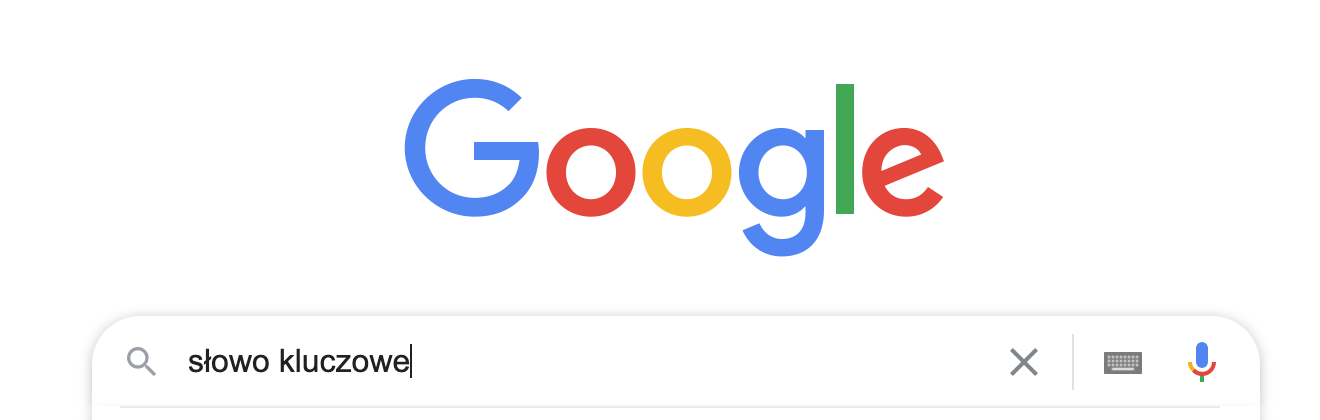
A keyword is a phrase consisting of one or more words that leads users to the materials they are looking for. In other words, "keywords" are all the terms that users enter into a search engine:
In simple search engines, such as those on online stores, the code fragment responsible for this element focuses on searching for a string of characters that make up a given phrase. More advanced search engines, such as Google, Bing, or Yandex, employ complex algorithms to deliver the best results. The complexity of search is related to the amount of data processed by search engines sorting content from across the internet. When results for even the most complex terms are displayed on several thousand pages, searching for a string of characters and presenting the results alphabetically would not be very effective.
You can read more about what Google takes into account in our guide – “ 123 factors influencing positioning ”.
Keywords – types and varieties
Search engine marketing—in a nutshell—is all about selecting the right keywords and strategically placing them within your website . Before we begin answering the question " how to find keywords " and delve into research, it's worth taking a look at the basic types of phrases we'll be looking for:
- Keywords short tail (short-tail keywords) – so-called "general keywords." These phrases consist of one or two words and are characterized by very high search volume, and therefore, competition. Another special feature is their relatively general nature, which is unlikely to favor conversions – after all, it's difficult to find your dream skirt model based solely on results related to the phrase "spódnica”. The same applies to wildcard phrases – depending on the search context, the user's goal may be completely different. An example?Pavlova" – when searching for this phrase, we may have in mind both the cake and Anna Pavlova, in whose honor this particular pastry was created. If we decide to enter the word in its Polonized version – "Pavlov's” to this mix we also add the Russian scientist Ivan, the dog's guardian… by the way, Pavlov.
Short, general phrases may seem attractive, but the cost of getting your website to the top of the search results may not be worth the results – i.e., they may not translate into website traffic, contacts, or purchases.
- Keywords long tail (long tail keywords) – a type of phrase that consists of at least three words. Characteristic features? Less search volume, but also less competitionLonger phrases are more specific and make it much easier to determine the purpose for which the keyword was entered into the search engine. The phrase "black pleated midi skirt” allows you to specify the specific features of the model you are looking for — color, type of decorations, and length. The same applies to “pavlova” – adding additional elements, e.g. “recipe for homemade" or "dancer Anna” allows us to determine whether we crave “something sweet” or whether we are just hungry for historical knowledge.
Accurately defining longer keyword phrases allows you to effectively address the needs of search engine users and significantly facilitates conversion. The cost of positioning long-tail keywords will vary between industries – in some it is still untapped territory, while in others the competition is just as fierce as for general keywords.
- Brand keywords — i.e. words associated with the brand. Phrases of this type usually contain all or part of your company name. Brand keywords also include keywords containing a fragment of your website. If your company name is original, brand keywords will in most cases return results from your domain. If your business name shares similarities with competitors' names (this is typical for some industries, e.g., window factories and installation services typically use the word "window" in all its forms), it's worth investing in additional promotion and optimizing your website with interesting brand keywords.
Attention! Positioning using the name of the competition is not a good solution. For optimization to be effective, it is necessary to place the selected brand phrase within the website., which may lead not only to information chaos and doubts on the part of potential customers, but also to unpleasantness on the part of competitors.
The above keyword division is one of the most commonly used. It's not perfect— keywords can be divided in several other ways, for example, taking into account their "use-by date"—into "short-term fresh" and "evergreen." The former certainly include phrases based on current trends. In 2022, such phrases included Putin and the question "How to help Ukraine?" "Evergreen" phrases are those whose search frequency doesn't typically include spectacular spikes in popularity, such as queries about weight loss methods or information on caring for houseplants.
The ideal solution is to find keywords from each of these groups —this type of diversification allows you to reach diverse audiences. Appearing in search results for different phrases also allows you to expand your reach and raise brand awareness. If a user receives satisfactory answers upon first encounter with your brand, there's a chance they'll choose your link again.
How to find relevant keywords for your website?
Keywords can be found using many available online tools. Before we dive into using the available software, let's take a moment to take a less technical look at keyword research.
Just as with building a website, when searching for keywords, it's important to define the GOAL that guides our efforts. If the goal of creating a website was to sell, we should focus on phrases that customers will use to search for products. If the website aims to strengthen our position as an expert in a given niche, the phrases we focus on will allow us to showcase our knowledge of the topic.
A website can simultaneously fulfill various purposes, such as selling products and providing industry advice. This is the case for DIY stores and bookstores, which also serve as cultural portals. It's also worth remembering that a website's purpose may change after a few months or years of operation. Change is a constant element of running a business, and its intensity and frequency depend on the industry and user expectations.
The second crucial issue is NICHE ANALYSIS. Analyzing industry activity online is equally crucial for new businesses and established ones just entering the internet. Online marketing and customer relations differ from traditional marketing and require a different set of skills and tools.
It is a good idea to start analyzing the online presence of your industry on forums and groups that bring together people interested in our topic, e.g. on Facebook:

What to look for? It's worth taking a closer look at what people interested in your topic are talking about, what questions they're asking (it's also a great place to draw inspiration for blog posts!), and what language they're using . It's also worth supplementing your research with competitor analysis—checking how they communicate with customers on their website and social media profiles . Reading comments can also provide additional insights—in the case of misguided ideas, social media users tend to have no problem criticizing the company's actions.
Defining the GOAL of our actions and identifying effective methods within our NICHE will allow us to determine the direction we should take when searching for keywords. Even a preliminary analysis will facilitate the identification of keywords—more general terms that will serve as a basis for further keyword research. Defining this basis will facilitate the use of tools that facilitate finding keywords.
"You're thinking like a client, you've brainstormed, emotions are running high, and you've identified a list of keywords – does that mean it's over? Unfortunately, no. Working on keywords, while seemingly simple, involves several stages and is worth devoting sufficient time to. We need to thoroughly analyze them for their suitability for use in a campaign and confront them with the harsh reality of pricing and budget," explains Danuta Janicka, Digital Ads & Optimization Specialist at Verseo and author of the Google Ads STEP BY STEP guide , which includes more helpful tips.
How to find keywords? Choose your tools!
Choosing the right keywords is the foundation of optimization and the entire website positioning process. Focusing on keywords that will convert is one of the key success factors of SEO efforts . Online tools will be helpful in finding keywords that align with your goals.
By using previously defined keywords, we can expand our phrase database with additional, related phrases.
Google's search engine aims to provide its users with the best possible answers to their questions. To achieve this, it uses suggestions to help formulate relevant queries:

Autocomplete is based on the popularity and similarity of phrases entered by the user. The search engine places significant emphasis on personalizing the content served to its users, so some suggestions will be based on the search history in your account. More general suggestions will appear when using incognito mode.
I also use similar suggestions on the search results page. Look for similar terms near the end of the top ten:

Keyword suggestions are not the only way to find attractive phrases using search engine data.
"Keyword Planner is a useful tool. It allows us to check the approximate search volume for a selected phrase, determine the level of competition we're facing, and obtain estimated cost-per-click rates for each phrase. This tool also allows us to obtain forecasts for selected terms under various spending scenarios and taking into account seasonality," notes Danuta Janicka.
You can find information on how to use it below and in the free Google Ads Keywords STEP BY STEP guide.
KEYWORD PLANNER – The planner is a tool dedicated to Google Ads campaigns . However, it can also be successfully used when searching for keywords for SEO. How can you find keywords that will meet your needs?
Start by going to the keyword planner page and signing in with your Google account.

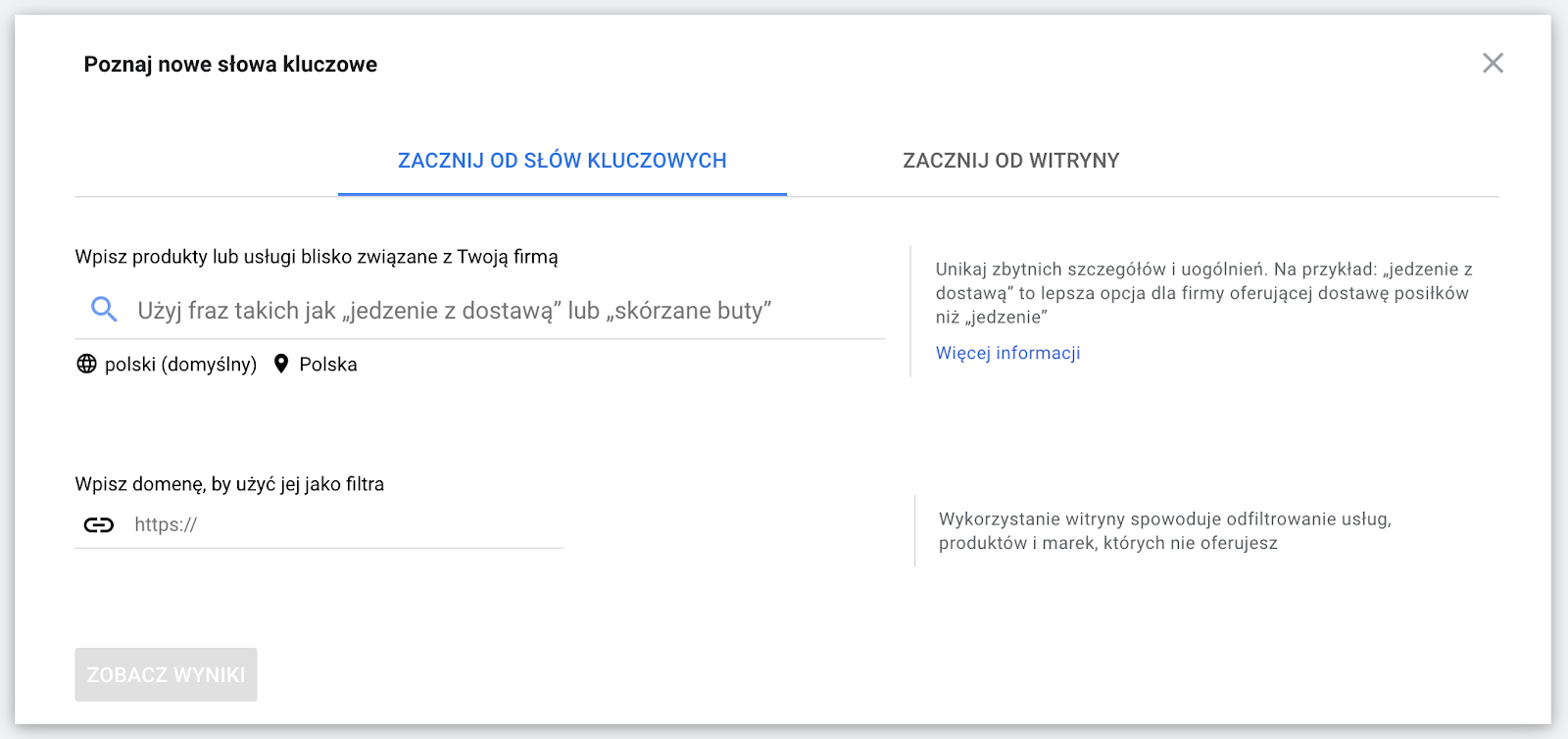
Remember your main keywords? Based on them, you can identify additional phrases that will better represent your business. When using the tool, remember to select the language and country you wish to target with your services.
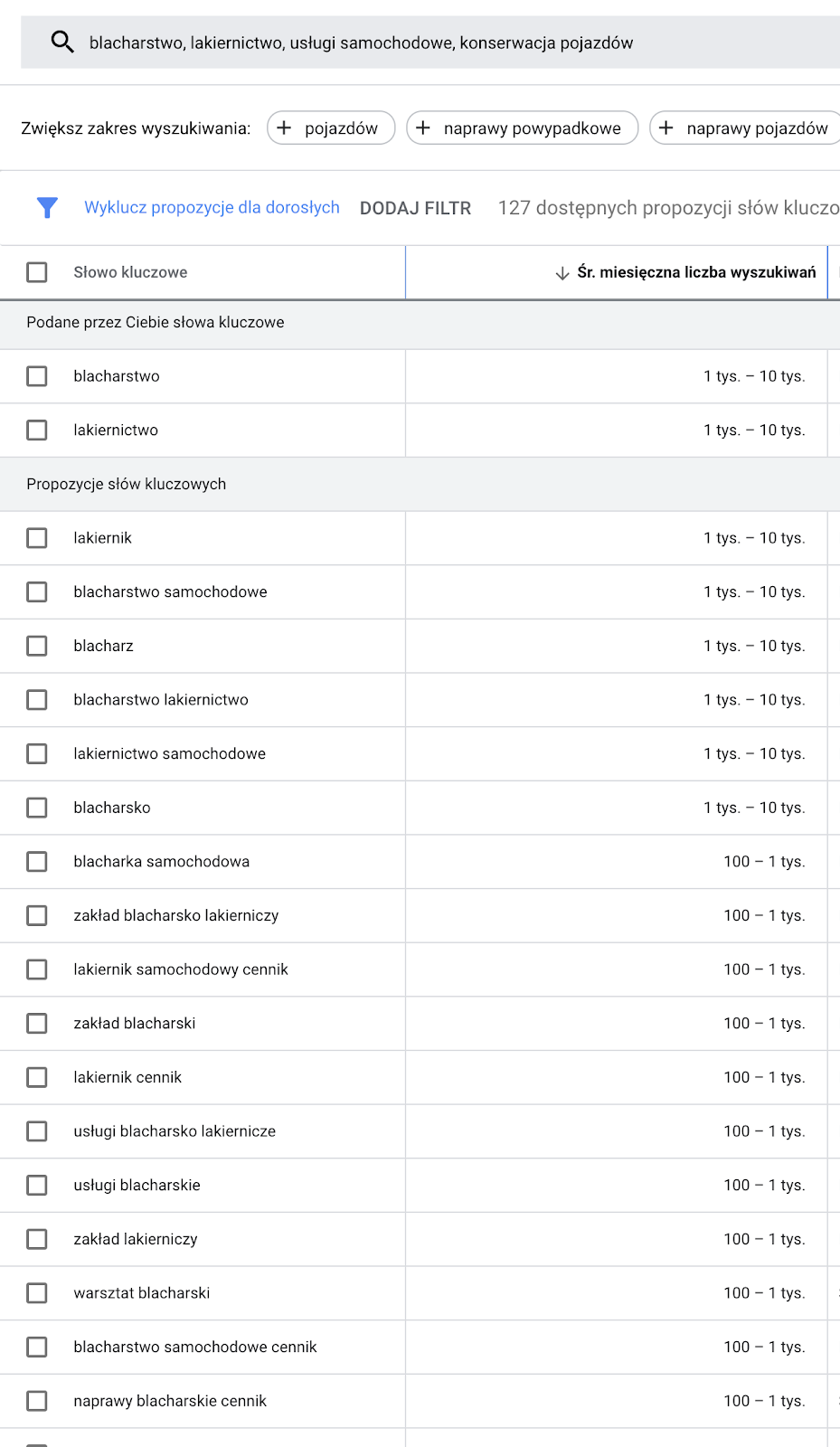
It's worth reviewing keyword suggestions based on search volume. Note that the "competitiveness" of these phrases is calculated for Google Ads purposes ; when searching for phrases for SEO, there's no need to consider the data collected in this column.
KEYWORDTOOL.IO – an alternative to Keyword Planner, considered by many experts to be "the best." The free version provides a limited number of words without additional statistics – but still enough to expand the list of keywords we're interested in. Keywordtool.io allows you to expand your keyword search to other media, including other search engines (Yahoo, Bing) and platforms like YouTube and Instagram.


UBERSUGGEST.IO – is a solution that not only helps you find keywords, but also provides quite a lot of data about them:
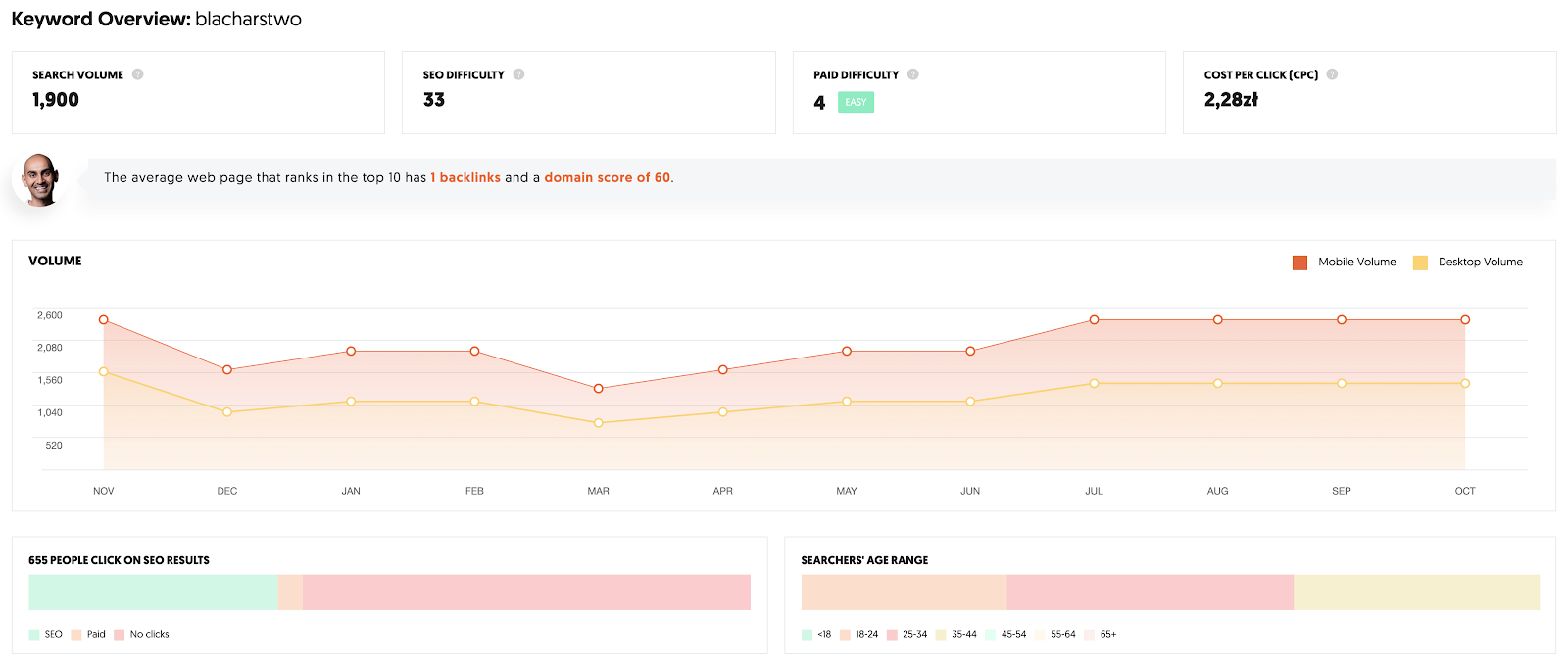
The chart shows the frequency of searches for the phrase of interest, broken down by mobile and desktop devices. Below, you'll also find information on the click-through rate for each term and the age of the users.
Keywords related to the one we entered are in the table below the charts.

Expanding the table allows you to view the top 10 for each keyword – including the estimated number of clicks for each position and additional information, such as the number of links or the number of shares on selected social media.
The free version allows you to collect detailed data only for the top ten results.
ANSWERTHEPUBLIC.COM — a cult copywriting tool that allows you to find keywords users are searching for. It's especially useful for searching for longer keywords and finding inspiration for blog post topics.

Tools with Polish roots are also doing very well on the market:
SEMSTORM – using the tool requires creating an account. After logging in, simply select the "KEYWORDS" tab and enter one of the keywords. Keywords are divided into:
- simple answers

- words with prepositions

- questions


and video. The results also include an alphabetically sorted list of keywords. Full account access allows for searches divided into more detailed analyses, including searches focused on phrases from titles and alternative image descriptions, typical of e-commerce, and a hashtag search.
SENUTO – in this program, we search for keywords in the "Keyword Database," a category accessible after creating an account. After entering keyword phrases, the tool returns a list of related terms.

As with other similar solutions, it divides phrases into basic phrases, questions, and word groups. It also allows for various forms of filtering results, for example, by considering specific phrases.
SURFER SEO – Keyword research in this tool begins with the Keywords Research tab. After entering a keyword, the tool provides results consisting of phrases similar to the searched phrase, including the search term, and questions.
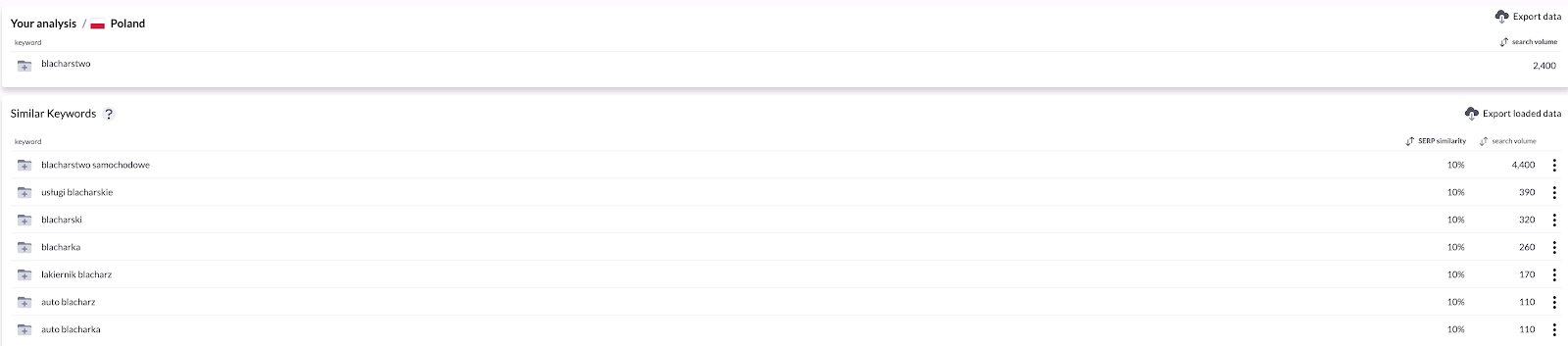
To obtain this data without paying a subscription, you can also use the free Chrome extension Keyword Surfer. This extension allows you to obtain more information about specific phrases directly during Google searches.
How to find… even more keywords?
Evolving our website's keyword database is inevitable, especially if we plan to further increase our visibility within the Google search engine. To do this, it's worth examining the phrases our website already ranks for—that is, the keywords it displays to users.
How to check the popularity of a website?
To do this, it's worth checking the PERFORMANCE tab in Google Search Console. Information about queries can be found in the table below:

The data collected in GSC is especially useful when we want to get the most out of existing websites that have already been indexed by Google . Perhaps among these terms are some we haven't considered before, but which have significant potential to increase the number of users on our site? The tool shows us not only the average position of our website; when we click on a term, we also get the address of the subpage that ranks for it and the device type.
Search term analysis can also provide additional information if we include one on our website. Google Analytics successfully collects this type of data.
And more and more and more... we don't need it anymore
When searching for keywords, it's crucial to be moderate and match their number to the size of your website. Space in key areas of each subpage (title, headings) is limited, as is the ability of web crawlers and users to process the information.
When creating keyword lists, it's worth planning their placement in a way that allows for optimization in line with Google's requirements, i.e., without "forcing" keywords. You can read more about this in the free guide recommended earlier.
This doesn't have to hinder the development of your keyword database—all you need to do is expand your content layer through a blog or news section. For online stores, you can also use other tricks, such as creating various unconventional product categories, which can be embellished with commemorative text.
And besides… your customers will tell you what they need – just observe them for a while! 🙂
Keyword FAQs
Keywords are phrases, terms, or questions that internet users type into a search engine (e.g., Google) to find information, services, or products they are interested in. They are the absolute foundation of effective SEO and Google Ads advertising campaigns.
Choosing the right keywords determines whether the right users will find your website. If you optimize your site for terms no one is searching for, you won't gain traffic. Choosing phrases that are too general can lead to random visitors, which won't translate into sales (no conversions).
These are complex, multi-word, and highly specific searches (e.g., "men's black asphalt running shoes" instead of the generic "athletic shoes"). Although they are less frequently searched, they generate significantly higher-quality traffic – a user entering such a phrase knows exactly what they're looking for and is usually closer to making a purchase decision. They are also easier (and cheaper) to rank for.
Basic keyword research can be done free of charge using:
- Google Suggestions (Autocomplete) and a "Related Searches" section at the bottom of the results.
- Google Keyword Planner – a free tool in the Google Ads panel.
- Google Search Console – shows what phrases your website is already appearing for in search results.
- Answer The Public – a great tool for generating questions asked by internet users.
For in-depth analysis, checking the exact number of searches, seasonality and competitors' activities, professionals use tools such as Ahrefs, Senuto, Semstorm and Surfer SEO.
When deciding on specific keywords, there are three main aspects to consider:
- Search Volume – how often a given phrase is entered into the search engine on a monthly basis.
- Competitiveness – how difficult it will be to break into the TOP10 results for a given keyword.
- Search Intent – whether the user entering this phrase is just looking for information or intends to make a purchase.
Summary
The above article covers the following topics:
- Keywords are phrases entered into a search engine that connect user queries with an offer. Search engines like Google use advanced algorithms to deliver the best results.
- Types of keywords: short tail of 1-2 words with high searchability and competition, long tail of at least 3 words, more specific and easier to convert, and brand phrases containing the company name or a part of the domain.
- The keyword research process involves determining the purpose of your website and analyzing your niche by observing forums, Facebook groups, competitors, and the language used by your audience.