Contents
You are now reading:
Boost Your Ads Performance – Google Ads New Year Checklist
Close
With the New Year just three weeks ago, for many of us it's a time of change, creating resolutions, and reviewing last year's plans and activities. The most popular resolutions we make at this turning point are often lifestyle-related, such as going on a diet, taking up exercise, quitting smoking, or learning a foreign language or other new skill.
Taking stock of the past year and planning and implementing changes for the next 365 days is a good move, as it allows us to reflect on how we've used our time and opportunities, whether we're heading in the right direction, and what needs to change to make our lives even better. Therefore, today we suggest you conduct such a review and planning not only in your personal or family life, but also in your marketing activities, especially Google Ads campaigns.
Below is a list of things to check during your annual Google ad account review, followed by a list of changes you might want to consider making.
Checklist of essential Google Ads settings
- Check your account optimization score and quality score (and its components)

- Verify the goals you set last year – if you planned to achieve a certain number of clicks, views, conversions, or you estimated the minimum number of orders or the maximum cost per conversion, check whether you managed to achieve the plan
- Review campaign statistics by month or season – see how your budget was distributed and how campaign results changed based on different periods of the year. Analyze traffic and results during specific times for your industry, such as Valentine's Day, Easter, summer holidays, Black Friday, and Christmas. Consider whether you were satisfied with the results of these campaigns, considering the expenses and amount of work involved.
- See how the share of ad impressions and CTR (click-to-impression ratio) changed depending on the month/season – this will allow you to better distribute your budget for the next year and plan appropriate actions in advance that will be likely to bring better results
- Consider how your offerings have changed over the past year – perhaps you've added new products or services, or made changes to your website that are worth informing current and potential customers about. Check if your website content is up-to-date – verify your price list and check if your opening hours are still accurate. It might be worth changing the target URL in your ads (because a recently added subpage better describes your services) or adding new ad extensions.
- If you have made changes to your offer, be sure to review your keyword list and exclusion list – check if they are up to date and if you are not wasting your budget on keywords that you should not be appearing for with your ads
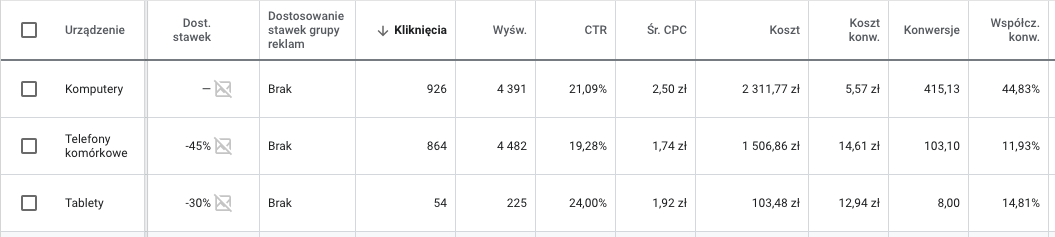
- Check if you've adjusted your bids per click based on devices, schedules, and locations. Review your CPCs and consider any changes – a lot could have changed over the past year, and your cost per conversion from mobile ads may have increased significantly compared to last year.
- Analyze the remarketing lists used within RLSA (remarketing in search engines) – check the traffic and the number, value and cost of conversions on an annual basis (if possible, compare with the previous year), see how it looked in each month/season and consider whether any changes need to be made to adjust the bids
- Be sure to check out the “Recommendations” tab in the panel Google Ads and check what changes the system proposes. Don't implement them all at once or without careful consideration. Instead, consider those options that seem reasonable.

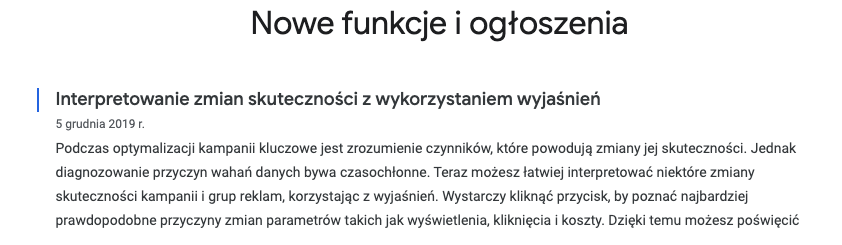
- Check out Google support, especially the subpage New Features and Announcements – and read about the latest changes/improvements that have been implemented. Perhaps a new campaign type or new ad targeting methods have emerged in the past year. It's always worth keeping up to date with what can be done within your Google Ads campaign, but we know that with the rush of work and responsibilities, there's not always time for it. So, take advantage of this special New Year's period and thoroughly explore what new things you can implement in your campaign.
- Don't forget to analyze your account Google Analytics – it's an excellent tool to support your campaign workflow. Be sure to check the average session length, bounce rate, and the ratio of paid traffic to other channels. See if any significant changes have occurred in the last year.
- When you perform your annual ad account review, also check out your competition. Find out if the same companies are still showing ads in the search engine. Select a few keywords that are most important to you and see if new searches have started appearing in response. Also, check out your competitors' websites and see what new offers they're offering.
A list of New Year's changes worth considering after analyzing your account
- Adjust your expenses and rates to current realities. Remember that rates in Google Ads campaigns They can rise from time to time, just like the price of butter, fuel, and other things on the market. After reviewing your campaign—if you're concerned about, for example, decreasing clicks or lower CTRs—or after analyzing your revenue from the previous year, consider changing your budget (also based on new goals).
- Be sure to exclude unnecessary keywords – even if there are only a few of them and the monthly costs are low. Remember, adding up a few zlotys each month can add up to a substantial sum over the course of a year. Also consider excluding high-cost keywords that haven't generated any conversions in the last year.
- Refresh your ad content and graphic banners – especially if you represent an industry that doesn't experience many seasonal changes and doesn't edit your ad content throughout the year for holidays, sales, or other promotions. Remember, if you sell products or offer services for regular use, the same people may read your advertising content, so it's worth serving them new information periodically.

- Prepare even the simplest plan for the entire coming year. Note important marketing dates, such as Children's Day (if you sell toys), and set a reminder so you can prepare well in advance and avoid coming up with catchy ad content at the last minute. While creating your marketing plan, you can prepare, for example, a monthly plan for reviewing and optimizing your campaigns.
- Clean up your advertising account – after all the changes you made last year, check if any ad groups might be worth breaking down into smaller units and separating the keywords you've inserted. Consider creating a new campaign or splitting your current one, as it has too many different products. Check if you have any empty ad groups left after pausing your keywords. Remember that a clear account structure makes campaign management and optimization easier.
- See if there's anything in your offer or campaign that customers aren't interested in at all – it might be worth cutting it out and allocating your budget to other products/services that sell significantly better and are worth investing in. At the same time, review your search terms and see what people who click on your ads are most likely to search for – this can help you focus on the right elements of your offer.
- If your business has grown so much that you barely have time for running a campaign Or if you're not entirely comfortable with optimizing it, consider using an external agency. Don't be afraid of the additional costs – a campaign run by specialists often generates revenue that offsets these expenses.
Remember that an annual review of your advertising account is crucial. Despite regular weekly or monthly checks, you can't always see everything in such a short period. 365 days is enough time to draw more conclusions, identify patterns, and conduct deeper analysis. This will make your campaign even more effective.
(The rest of the article can be found below the form)
Fill out the form and schedule a call with an expert
We'll get to know your business and prepare a personalized quote for the optimal marketing mix. Completely free.
The controller of your personal data is Verseo, a limited liability company with its registered office in Poznań, at ul. Węglowa 1/3.
About Verseo
The Company's registered office is located in Poznań. The Company is entered in the Register of Entrepreneurs maintained by the District Court for Poznań – Nowe Miasto and Wilda in Poznań, 8th Commercial Division of the National Court Register, under KRS number: 0000910174, Tax Identification Number (NIP): 7773257986. You can contact us by mail at the address provided above or by email at: ochronadanych@verseo.pl
You have the right to:
- access to your data,
- rectification of your data,
- request deletion of data,
- processing restrictions,
- object to the processing of personal data,
- transfer of personal data,
- withdrawal of consent.
If you believe that we are processing your data contrary to legal requirements, you have the right to lodge a complaint with the supervisory authority – the President of the Personal Data Protection Office.
We process your data for the purpose of:
- handling your inquiry, pursuant to Article 6(1)(b) of the General Data Protection Regulation (GDPR);
- marketing purposes consisting in the promotion of our goods and services and ourselves in connection with the consent you have granted, pursuant to Article 6(1)(a) of the GDPR;
- securing or pursuing possible claims in connection with our legitimate interest, pursuant to Article 6(1)(f) of the GDPR.
Providing your data is voluntary . However, without it, you will not be able to send us a message, and we will not be able to respond to you.
We may transfer your data to trusted recipients:
- providers of tools for: website traffic analysis, sending marketing information.
- entities responsible for hosting (storing) the website and personal data.
We will process your data for the period of:
- necessary to achieve the specific purpose for which they were collected, and after its expiry for the period necessary to secure or pursue any claims
- in the case of data processing based on consent until its withdrawal. Withdrawal of consent does not affect the lawfulness of processing prior to withdrawal.
We do not process personal data in a way that would involve making solely automated decisions about you. More information regarding the processing of personal data can be found in our Privacy Policy.
And if you need more tips, we invite you to one of our older posts: Google Ads Optimization Checklist , which includes as many as 31 checkpoints (which will be useful when optimizing your Google Ads account).
Summary
The above article covers the following topics:
- annual Google Ads account review and verification of key performance indicators,
- optimizing your budget, keywords and account structure to get more conversions out of your campaigns in the new year.