Contents
You are now reading:
Cookie banner – GDPR-compliant implementation instructions – how not to lose data from Google Analytics?
Close
Do you run an online store? Do you collect and store data? Find out what you need to know to prevent your GA campaign from being suspended! We've got a complete set of useful tips, suggestions, and examples for you. You'll find them in the following publication, which was created with the support of Klaudia Zielke (Head of Web Analytics at Verseo) and Mateusz Mielczarek (Legal Coordinator at Verseo). Crunch your cookie information and be sure no crumbs will fall on the GDPR.
Cookies are computer data (especially text) stored on user devices. They are used, for example, when entering login details or saving items in an e-shopping cart. Cookies also enable the display of personalized advertisements tailored to the interests and preferences of a specific user.
Psss… We wrote more about it HERE: >> Cookies – changes. How to eat your cake and have it too? <<
Privacy Policy and User Consent – Rules Applicable in the EU
As we read on the official Google websites , Poland is subject to two European legal acts relating to privacy policy:
(The rest of the article can be found below the form)
Fill out the form and schedule a call with an expert
We'll get to know your business and prepare a personalized quote for the optimal marketing mix. Completely free.
The controller of your personal data is Verseo, a limited liability company with its registered office in Poznań, at ul. Węglowa 1/3.
About Verseo
The Company's registered office is located in Poznań. The Company is entered in the Register of Entrepreneurs maintained by the District Court for Poznań – Nowe Miasto and Wilda in Poznań, 8th Commercial Division of the National Court Register, under KRS number: 0000910174, Tax Identification Number (NIP): 7773257986. You can contact us by mail at the address provided above or by email at: ochronadanych@verseo.pl
You have the right to:
- access to your data,
- rectification of your data,
- request deletion of data,
- processing restrictions,
- object to the processing of personal data,
- transfer of personal data,
- withdrawal of consent.
If you believe that we are processing your data contrary to legal requirements, you have the right to lodge a complaint with the supervisory authority – the President of the Personal Data Protection Office.
We process your data for the purpose of:
- handling your inquiry, pursuant to Article 6(1)(b) of the General Data Protection Regulation (GDPR);
- marketing purposes consisting in the promotion of our goods and services and ourselves in connection with the consent you have granted, pursuant to Article 6(1)(a) of the GDPR;
- securing or pursuing possible claims in connection with our legitimate interest, pursuant to Article 6(1)(f) of the GDPR.
Providing your data is voluntary . However, without it, you will not be able to send us a message, and we will not be able to respond to you.
We may transfer your data to trusted recipients:
- providers of tools for: website traffic analysis, sending marketing information.
- entities responsible for hosting (storing) the website and personal data.
We will process your data for the period of:
- necessary to achieve the specific purpose for which they were collected, and after its expiry for the period necessary to secure or pursue any claims
- in the case of data processing based on consent until its withdrawal. Withdrawal of consent does not affect the lawfulness of processing prior to withdrawal.
We do not process personal data in a way that would involve making solely automated decisions about you. More information regarding the processing of personal data can be found in our Privacy Policy.
- GDPR – General Data Protection Regulation.
- The ePrivacy Directive – which was published in 2015 and updated three years later, following the introduction of the GDPR.
IMPORTANT! Who must comply with the privacy policy?
All publishers and advertisers whose corporate headquarters are located in the European Economic Area (EEA) or the UK.
Cookies and user consent – what's changing in 2022?
Google Support explains the most important changes to the privacy policy, which also cover online advertising activities:
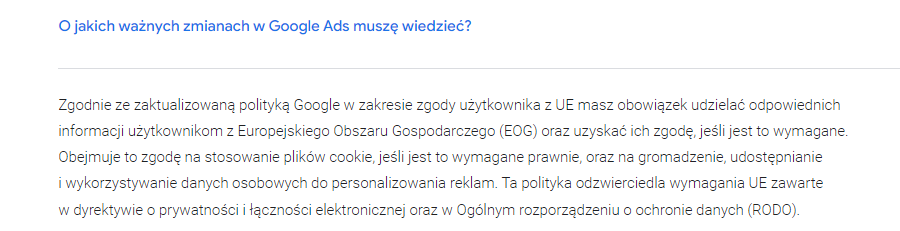
As Klaudia Zielke, Head of Web Analytics at Verseo, explains:
The way users can decide what a website owner can do with cookies stored in their browser has changed. These changes apply to both the e-commerce and service industries. Previously, it was sufficient for the domain owner to inform the recipient about the collection, processing, and use of information. Now, users can make a realistic and informed decision about whether or not they consent to this.
Cookie banner and user consent – an example from the past and present
Cookie Banners used to be:

Cookie Banners Today:
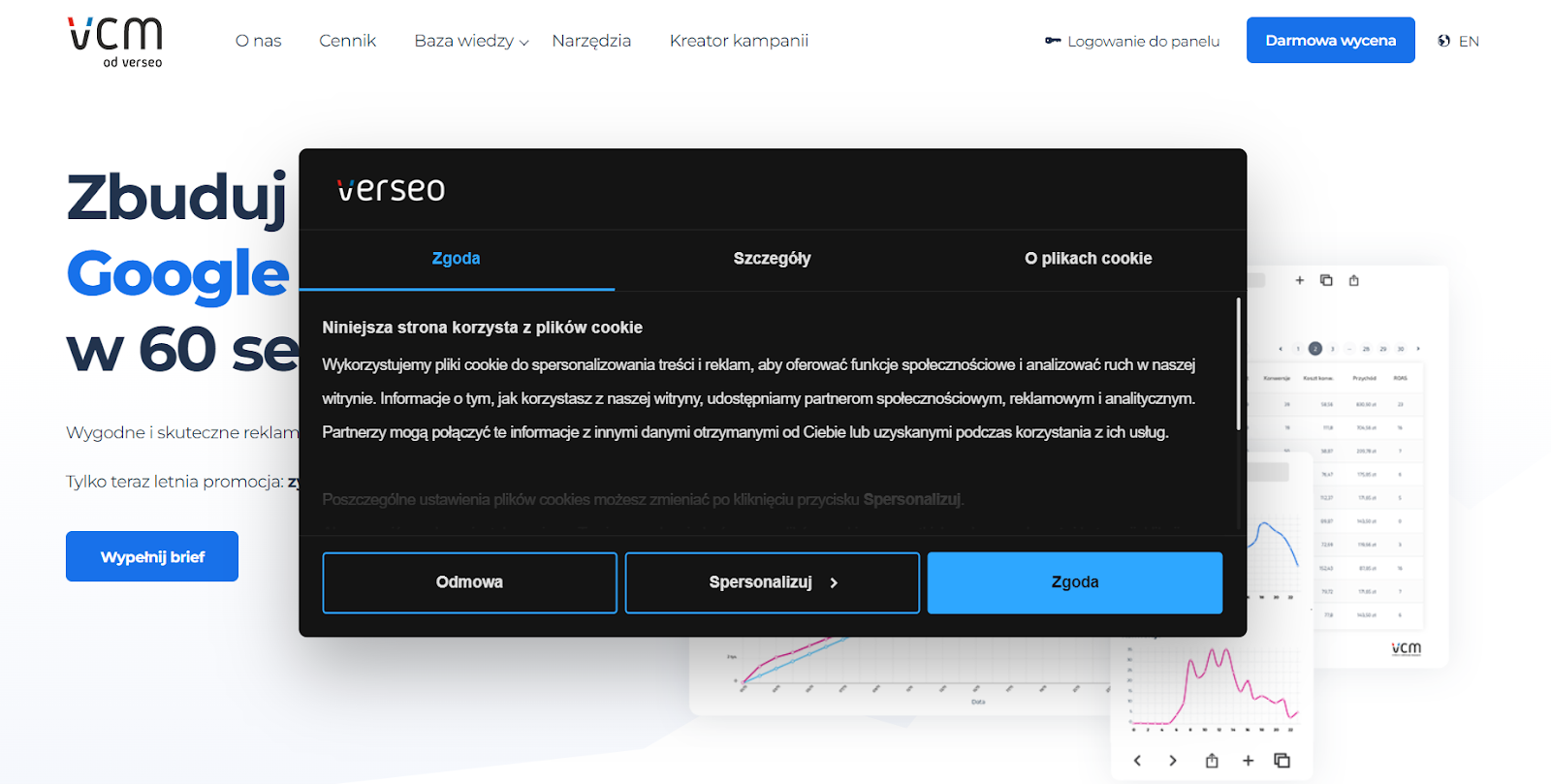
Currently, the cookie banner has buttons that allow the user to:
- consent to the collection of data about his/her activities on the website;
- personalizing them;
- or complete rejection.

For the consumer, this is a change for the better – they are more aware, better informed and can make their own decisions about what they agree to and what they are not comfortable with.
Previously, they didn't have this choice—they were simply informed that cookies were being collected. If they didn't agree, they had to leave the site. Now, they can use all aspects of the site without having to provide any consent, except for essential cookies , which are required for the site to function properly. This includes, for example, the ability to save products to their shopping cart, which facilitates further use of the site. However, consumers don't have to consent to analytical or marketing cookies," explains my interlocutor.
What does this mean for website owners? What are they losing or likely to lose as a result of these privacy policy changes?
If a customer doesn't consent to, for example, analytical cookies , the website owner can't collect information about the user and their activity on the site in Google Analytics. Lack of consent to marketing cookies, on the other hand, means they can't return to the potential customer with dynamic remarketing, says Zielke.
How can we avoid losing the ability to collect information essential to business, marketing, and sales? How can we act in accordance with these new requirements?
First of all... think carefully! You need to carefully consider what the cookie banner should look like, its size, and where it should be placed on the website. Should it be a floating banner that follows the user, or a more expressive banner? The higher its visibility, the greater the impact on the data we can collect. The way it encourages the user to engage in related activity is also crucial," explains the Verseo specialist.
Good to know…
When cookie banner:
- is small, difficult to see (for example, it appears at the bottom of the page),
- follows the user,
- does not draw the recipient's attention enough and does not encourage interaction,
The chance that a user will make a decision to accept or reject cookies immediately after entering a website is small. Failure to do so upon initial contact with the website is equivalent to rejecting all cookies – the owner has no data about the consumer visiting their site . That's a huge loss!
Consequences and penalties imposed by Google
If you're running a GA campaign and your banner isn't properly customized, the consequence may be account suspension. Google sends a warning beforehand, asking you to adjust your banner cookie. You have 7 days to do so. If the changes aren't implemented well enough within that time to successfully complete the verification process by Google specialists, the campaign will be paused and your account will be suspended. It's worth clarifying that the 7 days mentioned are not only the time to implement the changes, but also for Google support to verify that you've done it correctly. Verification happens quite quickly, but we know from experience that it's not worth waiting for ," Zielke warns.
As we can read in the official Google support message:

Cookie Banner – types
Should we use different types of cookie banners depending on the information we collect or industry specifics?
There are no separate cookie banners for e-commerce and services. The template is flexible and adapts to the cookies collected on the website. If we implement it through ready-made tools, which are the cheapest and simplest, they automatically detect cookies on the website," explains Klaudia Zielke.
Simply check which files have been detected. For Cookiebot, information about the origin of detected files can be found in the management panel. If the tool used by your department isn't listed, simply add it manually.
Systems that help with implementation, such as the previously mentioned Cookiebot, automatically adapt the banner's appearance to the requirements.

Cookie banner created using the Cookiebot tool
" When it comes to creating a cookie banner, the entire graphic design is handled by the tool. Content templates are available on the platform—we can modify them to suit our individual needs. Tools like these already have built-in features that automatically remove the most common and basic cookies. For example, Analytics, Google Ads conversion codes , remarketing, Pixel, HubSpot, or other popular CRM systems . The problem arises when adapting the cookie banner to unique solutions dedicated to a specific website. In such cases, the tool may not be able to handle it because the file isn't in its library. In such cases, you should contact the people who manage the system to specify which cookies they use," explains Zielke.
Cookiebot automatically inserts a clause that can be customized to your needs – for example, by adding a link to the privacy policy or specifying the purpose for which data is collected.
When will Cookiebot not work automatically?
Cookiebot is not compatible with websites whose analytics rely on plugins , such as e-commerce stores based on the PrestaShop platform. The solution is to find a suitable plugin that is compatible with the existing tag implementation. It's worth contacting its authors to see if the added cookie banner will be able to customize the firing of existing tags in accordance with the user's consent. If you own a store with a Shoper-based engine that already has such solutions built-in, it's best to contact support. They will help you through the banner implementation process. The best chance of successfully implementing a cookie banner using Cookiebot is with the WordPress (WooCommerce) platform . This is because most websites configure analytics using GTM ," explains the Verseo specialist.
Important!
Consents in the cookie banner – except those that are necessary for the proper functioning of the website – must be unchecked.
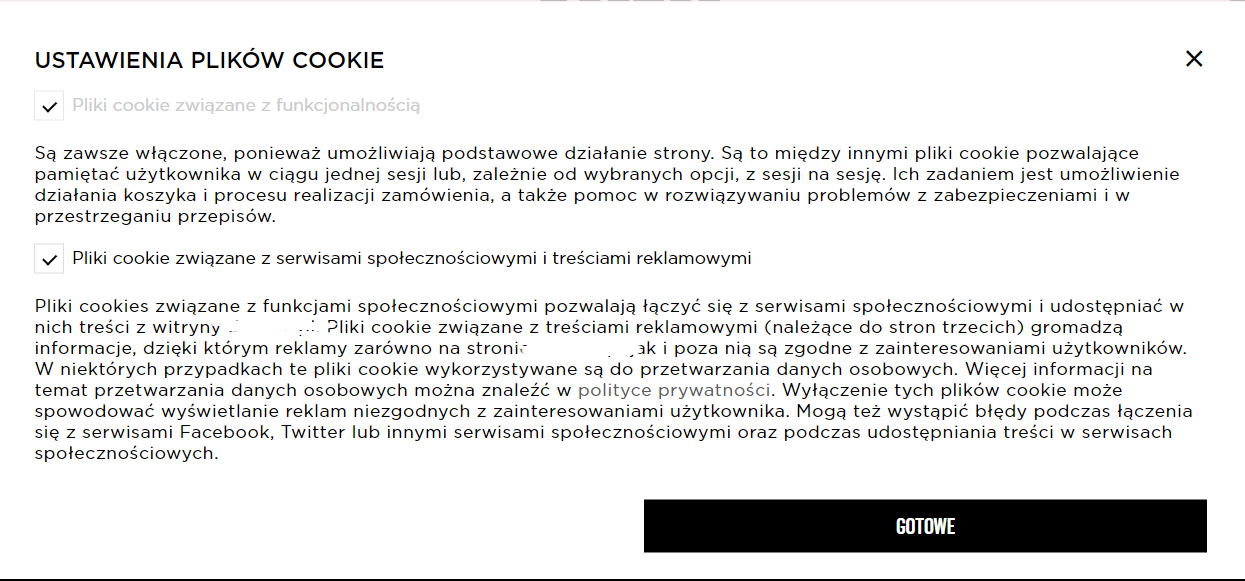
Cookie Banner – Don't do that!
In accordance with changing regulations, consents (except those necessary for the proper functioning of the website) should be deselected. Below is an example of an improperly designed cookie banner , where all consents, including marketing consents, are automatically selected.
Cookie Banner – Examples. What Should It Look Like?
After the theory, it's time for practice. Let's see what a cookie banner should look like to meet the new GDPR requirements while also being user-friendly and user-friendly for the website owner.
You don't have to look far for good examples. YouTube, for example, welcomes us with a banner "from the moment we cross the threshold" that's hard to miss or overlook:

Simple, clear and persuasive – the way it should be done.
Fun fact…
Google hasn't always led by example! Earlier this year, the French data protection agency CNIL fined Google €150 million for misleading language in cookie banners that could lead users to select the "I accept" button more often. As a result of the fine, Google introduced an additional "Reject all" button.
The cookie banner that welcomes us to the eobuwie.pl website also deserves to be included in the list of good practices due to the transparency of the message.

"This cookie banner is clean, unobtrusive, and unobtrusive. Users receive a clear message, see all cookies used on the site, and importantly, they are deselected. If they want to know the purpose of collecting them, they have a clear, concise description on the side. It's well done, " says Klaudia Zielke.

Cookie banner – customization and implementation cost
The process of implementing a cookie banner on a website is divided into two stages:
- Actions visible to the user – i.e. hanging a banner on the website.
- Back-office activities – necessary for the banner to function properly. They involve adapting the tags that are triggered on the page to the specific consent expressed by the user.
How the consent procedure works in practice – an example
Mr. Krzysztof owns the website www.test.pl, where he has Google Ads and Analytics tags . Because it's working properly, he's already adjusted the cookie banner to comply with current requirements. Below, we describe what happens when a user selects a specific button and visits Mr. Krzysztof's website.
- The user selected the button “Accept all cookies” – Mr. Krzysztof can see whether this user's visit resulted in a conversion, what pages they visited on the website, what advertisement prompted them to visit the website, and many other things.
- The recipient selected the option "Customize":
Variant 1
The user chose not to accept marketing cookies (in this case, Google Ads ) – Mr. Krzysztof will not be able to return to him with dynamic remarketing. Conversions measured by ad tags will also not be recorded, which may negatively impact the long-term results of advertising campaigns. Conversion data collected by analytical cookies (Google Analytics) and remarketing lists created in Google Analytics will continue to collect data correctly.
Variant 2
If the situation is reversed and the user declines analytical cookies but does accept marketing cookies, Krzysztof will lose information about potential conversions, pages visited, and actions performed on them, as measured by Google Analytics. The recipient will also not be added to the remarketing list we created in this tool. However, conversions measured by Google Ads tags will still be collected. So what about the data we've just lost? The next generation of Google Analytics – GA4 – will model the behavior of users who decline consent to analytical cookies (analytics_storage) to fill the data gap. This is done based on the behavior of similar users who do accept them. If you haven't yet implemented the latest version of Analytics, called GA4, on your website, don't delay, or your data will slip through your fingers. You can read more about this HERE.
- If you select “Reject all” Krzysztof won't be able to collect data through any of the tools (Google Ads and Analytics)—neither about conversions nor user behavior. He also won't be able to return to these users with a message via remarketing campaigns. In this situation, he's left with relying on modeled data (so-called behavioral modeling) in GA4 or on enhanced conversions available in Google Ads.
If we implement a cookie banner using Cookiebot or another similar tool, there's still the matter of connecting it. We can outsource this to an external company or a technical department within our own organization.
At Verseo, the rate for linking starts at 1000 PLN. If the client already has everything set up in GTM, we handle the customization so that tags fire based on the user's consent. However, it often happens that GTM doesn't have tags because we're dealing with plugins. This is a popular and inexpensive solution, but it's incompatible with Cookiebot. In such cases, it's worth considering implementing the banner using a plugin that will customize tags based on the user's specific consent, " explains Verseo's Head of Web Analytics.
GDPR regulations. What is a GDPR information clause?
As Mateusz Mielczarek, Legal Coordinator at Verseo, explains:
An information clause is a document that contains all the necessary information about the data processing process. […] In an age of advanced computerization, it is necessary to protect the privacy and freedoms of citizens, provide them with access to information about what happens to their personal data, the right to decide whether to share it, and the option to be forgotten, i.e., to have their personal data deleted from the database of entities processing it. […] The GDPR information clause can be sent to the recipient via a link on the website or by email.
The information clause used in Verseo can be found HERE.
GDPR clause – types
As with the cookies described earlier , there is no specific division of clauses. Their nature and form must be tailored to individual needs.
There's no specific division into clauses. It all depends on the purpose of data processing. A clause in an online store will look different than a clause on a blog. The e-commerce industry collects data to fulfill orders and shares this data with couriers, postal services, mobile payment intermediaries, accountants, etc. A blog collects data to communicate with recipients by allowing them to comment on posts, send emails to readers, etc.," explains Mateusz Mielczarek.
In what cases do you not have to use the information clause?
A privacy policy is not mandatory. If a website does not collect or process data, it does not need to have a privacy policy.
You do not have to use the information clause if your website does not contain:
- registration form,
- commenting options,
- possibility of placing orders,
- subscription to the newsletter.
GDPR clauses – what information to collect?
As Mateusz Mielczarek, Legal Coordinator at Verseo, explains, only the necessary data.
An online store will need the name, address, and phone number of the person placing the order. A blog will only need an email address and, for example, a first name. The GDPR regulation does not specify the specific data that a specific entity can collect based on the type of business it conducts. This should be tailored to the nature of the specific company. For example, if you run a fashion blog and inform your users that you will be sending them text messages with the latest in-store promotions, collecting a phone number is justified. However, an online store doesn't need, for example, a customer's ID number to fulfill their order.
What should a properly drafted GDPR clause look like?
As my interlocutor emphasizes, there is no predetermined content for an information clause. However, it is generally accepted that it should clearly indicate the purpose of data collection and be understandable to the recipient.
GDPR clause – examples
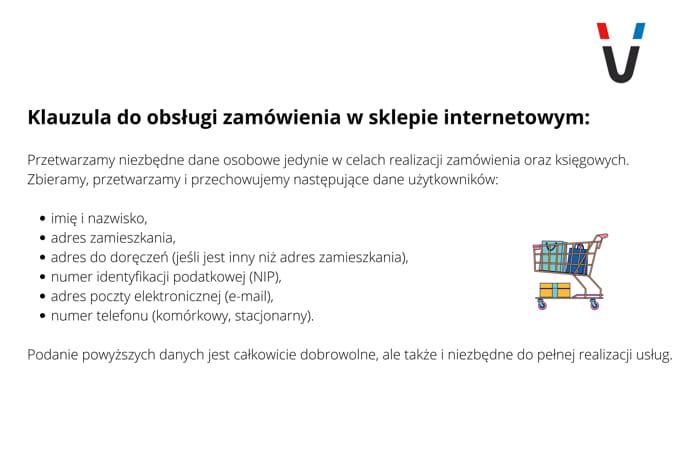
Clause for order processing in the online store :
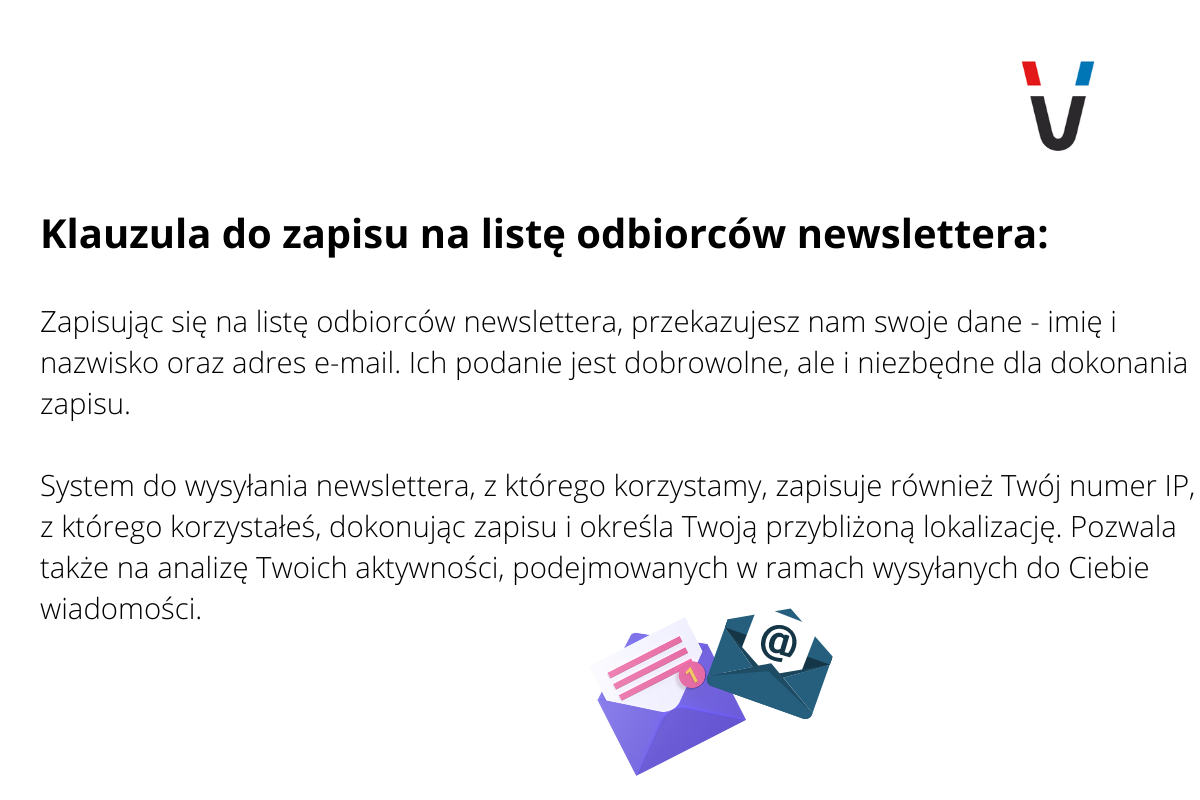
Clause for sending the blog newsletter:
Penalties for poor GDPR implementation
There is no separate penalty for failing to implement or improperly implementing a company's privacy policy. However, this doesn't mean we don't face any consequences – we may face them for violating GDPR regulations.
The Personal Data Protection Office (UODO) determines the type of violation, its severity, and the amount of the fine, taking into account all the circumstances. The UODO also sets limits on the amount of the fine. These limits are up to €10 million or €20 million, or up to 2 or 4% of the company's annual turnover from the previous year , explains Mateusz Mielczarek.
Important!
The information contained on this website does not replace a private consultation with a specialist who will provide you with personalized information regarding the obligations arising from the GDPR, which will be tailored to the specifics of your business.
If you want to ensure your privacy policy complies with applicable regulations, it's best to seek professional help. There are many companies on the market that offer the service of creating and customizing privacy policies for your business. If your website is based on a CMS, you can use a plugin that will automatically implement the privacy policy. However, remember to always use proven solutions and seek advice from those who implement such solutions on a daily basis , advises Mateusz Mielczarek.
Cookie Banner FAQs
This is a pop-up window or information bar displayed to users upon their first visit to a website. Its purpose is to clearly inform them about the collection of data via cookies and to enable them to make an informed, voluntary decision to consent (or not).
For a banner to be 100% legal, it must offer the user a real choice. The following buttons must be equally prominent:
- "Accept all" (agreeing to all scripts),
- “Reject all” / “Only necessary” (refusing consent to marketing/analytics scripts),
- "Manage consents" / "Settings" (allows the user to selectively select what they consent to). Additionally, the banner must include a short message about the data processing purposes and a link to the full Privacy Policy.
No. GDPR requires the use of the opt-in principle (active user action). Using so-called dark patterns, such as forcing consent, pre-ticked boxes, or hiding the deny button deep in the settings, is illegal.
Consent is not required for essential (technical) cookies. These cookies are absolutely essential for the website to function properly – they are responsible for things like security, maintaining a user's login session, and saving items in the shopping cart. They may load by default.
A properly configured banner is the foundation of Google Consent Mode v2. The banner collects the user's decision and sends the appropriate signal to Google tags. This allows systems like Google Analytics 4 and Google Ads to know whether they can store tracking cookies on the user's device or whether they must operate in anonymized mode.
The consequences are twofold:
- Legal: Risk of imposing severe financial penalties by the President of the Personal Data Protection Office (UODO) for violating privacy regulations.
- Business and marketing: The lack of an implemented banner integrated with Google Consent Mode v2 results in the inability to create remarketing lists in Google Ads, problems with measuring conversions and a drastic decrease in the profitability of advertising campaigns.
According to the GDPR, withdrawing consent must be as easy as giving it. The website must have a mechanism implemented (e.g., a floating cookie icon in the corner of the screen or a link in the footer) that allows users to re-enable the banner and change their preferences at any time.
Summary
The above article covers the following topics:
- Poland is subject to the GDPR and the ePrivacy Directive, which all EEA and UK publishers and advertisers must comply with.
- The user can now make real decisions about cookies by clicking on the buttons to accept, personalize or reject consent, and failure to make a decision means rejecting all cookies.
- Failure to consent to analytical cookies prevents the collection of data in Google Analytics, and failure to consent to marketing cookies blocks dynamic remarketing.
- Google may block your advertising account if you do not customize the cookie banner within 7 days of receiving the warning.
- Cookiebot automatically detects cookies and creates a banner, but may have problems with platforms like PrestaShop that use analytics plugins.
- The cookie banner should be clearly visible and encourage interaction, as a small, barely visible banner results in the user's inaction, which is equivalent to rejecting cookies.
- All consents other than those necessary for the operation of the site must be unchecked by default in the cookie banner.
- Good examples of banners are YouTube and eobuwie.pl with clear messages, marked consents and easy access to descriptions of the data collection purposes.
- Implementing a cookie banner involves placing it on the website and adapting tags to user consent, costing from PLN 1000 and up.
- The GDPR information clause contains information about the data processing process and must be adapted to the type of activity and the purpose of data collection.
- The information clause is not mandatory if the website does not have subscription forms, the option to comment, place orders or subscribe to the newsletter.
- Fines for GDPR violations are imposed by the Personal Data Protection Office and can amount to up to 10 or 20 million euros or 2 or 4% of the company's annual turnover from the previous year.